Once upon a time, le moi was writing his Friday article. This poor soul needed a few screenshots and lo and behold his Spectacle tool presented a not so spectacular behavior. Spectacle required the following actions to make one screenshot: open Spectacle -> Area: Rectangular Region -> click on Take a New Screenshot, the mouse pointer disappears, then open again Spectacle from Super -> click again, take a New Screenshot, then I could see the pointer normally. So, for the price of 2 screenshots, I got one. Makes sense since we are near the November’s Black Friday.
Anyhow, let’s try to solve this price imbalance, shall we?
My OS is Kubuntu 22.04 (I’m giving some time to update to 24.04). Now, I did not have this issue before. So, it seems this might be an issue with an update.
spectacle --version
The version is:
spectacle 21.12.3
We can use journalctl to check the logs of spectacle and see what is going.
journalctl | grep spectacle
The output tells me that I have an error a few days back with a mimetype. What in the world?
1. kglobalaccel5[2796]: kf.globalaccel.kglobalacceld: No desktop file found for service  "org.kde.spectacle.desktop"
2. PackageKit[2915]: in /8040_dedcabaa for install-packages package kde-spectacle;21.12.3-0ubuntu1;amd64;+manual:ubuntu-jammy-universe was installing for uid 1000
3. tracker-extract[4598]: Could not get mimetype, Error when getting information for file “/usr/share/applications/org.kde.spectacle.desktop.dpkg-new”: No such file or directory
4. tracker-extract[4598]: Task for 'file:///usr/share/applications/org.kde.spectacle.desktop.dpkg-new' finished with error: Error when getting information for file “/usr/share/applications/org.kde.spectacle.desktop.dpkg-new”: No such file or directory
We can find the same logs with the Ksystemlogs program.
Can this be the source of the issue? The system cannot know the MIME type because the file is not found there. Maybe, this is causing my issues when I open the program. But, on further looking this is not the case because this happened a few moments earlier when I was trying to lazy technique of re-installing, and uninstalling and installing.
This did not help. Then, I decided to create this file manually, since the reinstallation did not create it.
sudo nano /usr/share/applications/org.kde.spectacle.desktop.dpkg-new
Please, add the following information in the file, save (Ctrl + S) and exit (Ctrl+X) the file:
[Desktop Entry]
Version=21.12.3
Name=Spectacle
GenericName=Screenshot Capture Utility
Comment=Capture screenshots of your desktop or applications
Exec=spectacle %U
Icon=spectacle
Terminal=false
Type=Application
Categories=Graphics;Photography;
MimeType=image/png;image/jpeg;image/jpg;image/bmp;image/x-portable-pixmap;image/x-portable-bitmap;image/x-xbitmap;image/x-xpixmap;image/x-tga;image/x-icns;image/x-ico;image/x-pcx;image/x-png;image/x-xcf;image/x-xwindowdump;
X-KDE-StartupNotify=true
X-KDE-Protocols=file,smb
Then, we update the desktop database
sudo update-desktop-database
Then, this did not help and I decided to update to a new version. For that, I added the Kubuntu back-ports:
sudo add-apt-repository ppa:kubuntu-ppa/back-ports
sudo apt update
Then, I install the newest version available:
apt-cache policy kde-spectacle
sudo apt install kde-spectacle=24.08.2-0ubuntu1
This did help almost. However, once every 20 times, I press the Take a New Screenshot button the tool decides to not go into Screenshot mode and I had to open the Spectacle tool again. Then, I went for a 5 minutes walk and the idea came that I’m using a laptop plus monitor setup and that can be related. I disconnected the monitor, and voilà, the issue disappeared.
This might be a bug. So, I decided to file a ticket with the KDE community: https://bugs.kde.org.
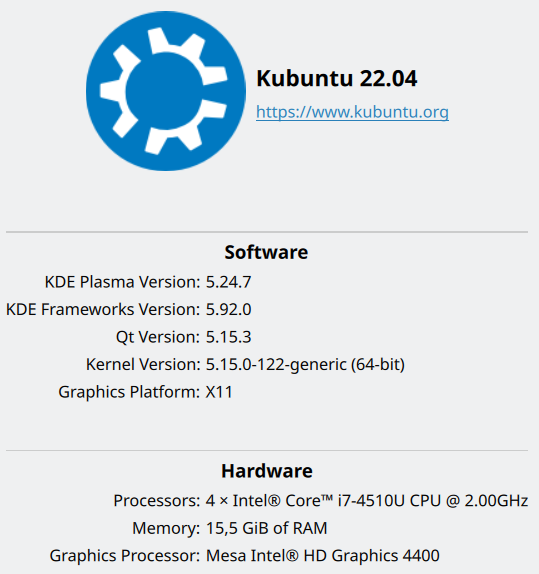
Create an account, check that your problem or a similar one is not already reported as a bug. The details requested for my problem are: KDE Plasma version, KDE Frameworks version, Qt version, kernel version, Graphics Platform.
To check the QT version:
dpkg -l | grep libqt
Or, in Kubuntu, go to System settings -> About this System.
Conclusion
Sometimes, we set out to repair an issue, but we can quickly find out that we can’t repair it completely because there is a defect in an application, and we need to report this as a bug. The KDE community will hopefully take a look on this. Or probably this is already solved in Kubuntu 24.04. In any case, let me finish my Friday post.
Cheers!